Tagged "ipad"
-
-
-
Keep reading →
That MacBook Air (and the iCore of the Future)
I'm officially a fan. I think it's the SSD that manages to make an ultralight laptop packing a 1.4GHz processor and 2GB of RAM feel as nimble as a desktop with a 2.4GHz processor and 8GB of RAM. There are some things I don't do on the Air: It's not running MySQL, Apache or Rails. But for all the "normal computer" stuff —surfing, writing, mail, RSS, light coding — it's great. It even seems to run WinXP in VMWare pretty well, though doing that manages to get the (very quiet) fans to spin up.
Some day, if my situation changes such that I don't want to have a big desktop machine handy, I can see entertaining the notion of owning another "full-sized" laptop, like a MacBook or MacBook Pro. For now, though, I don't think I'll ever want to own a notebook larger than an Air. It does everything I need in a notebook at about half the weight and without any sense that I'm making some big tradeoff. In fact, the old white MacBook just feels bloated and unnecessary: A device packing too much because there was a good chance it was going to be The Main Computer for a lot of its anticipated market.
Having had both side by side for a week now, I'll be the first to say that having both an Air and an iPad is an unimaginable extravagance. There may be times when I'll be glad to shave an extra pound off my bag and take just the iPad along, but I think I'd also be about as happy having my iPhone in a lot of those cases. During the day, when I'm still working but taking a break from the desk, there's no way the iPad makes more sense than the Air.
Could it ever? Maybe, but it would involve Apple building the sort of hybrid device that third parties have stepped in and created with iPad keyboard cases, and it would involve Apple opening iOS more than it seems willing to. My day-to-day basics are heavily tied up in things like being able to use clipboard history applets, quick flipping between apps that are guaranteed to remember their states under normal load, and browsers that don't need to reload tabs if I've been away from them. With those things, I could make some of the compromises needed to work around other deficiencies.
I'd like "some sort of hybrid device" a lot, but here's my notion:
In under ten years, Apple's going to be selling us iPhone-like devices we'll jokingly call "iCores," because they'll (either literally or virtually) snap into the back of three form factors: larger tablets, notebooks and consumer desktops. The iCore will pack enough RAM, processing power and storage to do everything you need in a desktop computer today (with some help from the cloud). It'll just be less wasteful about it, because you won't need three different CPUs, GPUs, storage devices or sets of RAM. Instead, each form-factor will have a slot for some kind of physical interconnect or enough wireless hardware to communicate with nearby iCores and drive audio/video/input: They'll be thin hosts to a fat client where fat has been defined down to "thin metal wedge you can slide into your pocket and use as a phone, too."
-
-
-
-
-
-
Keep reading →
"The iPad doesn’t need to do everything"
Marco Arment says the iPad doesn’t need to do everything:
The iPad is a great device, but what’s it for, really?
Logically, it doesn’t make a lot of sense for most computer owners. In reality, if you needed a laptop before, you probably still need one. If you want to read novels, the Kindle is still a much better device for that. If you need a small computer for ancillary tasks that’s always connected and always with you, an iPhone is better (and you probably already have one). And, even though it’s a great deal for the hardware, most people will have trouble justifying the $500 entry price.
But using it is satisfying and delightful, and there are some things that it does better than a computer. That list isn’t as big as I, and probably most early buyers, initially assumed. And that’s OK.
The other side of the “if you needed a laptop before” coin is that iPads can serve as a laptop replacement for a number of people who never actually needed everything they got with a laptop but bought one anyhow.
Personally, I never want to travel with a laptop again, and I’d say travel is the big differentiator between laptop and iPad for me. If I were just sitting around at home, a laptop would be slightly less comfortable than an iPad and I’d like it less for Web browsing or playing the sorts of games I’ve come to enjoy on the iPhone OS. At the same time, I don’t think I’d be pacing the room because I didn’t have the iPad. Marco’s right that it’s not an essential device, to the extent you can do what it does with other devices.
But when we went out to the coast last weekend, I was really, really pleased and it was so much better than a laptop. I brought along my wireless keyboard because I knew I might have to do some work. The combined weight of the iPad and keyboard came in under that of an ASUS eeePC 1000, and when I was done using the keyboard it went back in my suitcase and stayed there, while the iPad continued to serve as a general purpose device that was a lot more comfortable to use sitting around in the cottage’s living room than an eeePC ever would have been.
Marco notes toward the end:
Accepting that the iPad isn’t an all-purpose computing device is going to be a slow process for everyone, including Apple. They can’t quite explain what it’s for, either, which is why the launch marketing, software, and accessories are a bit scatterbrained.
If you want to put it alongside a laptop and say “it’s not a laptop,” there’s no disputing that. But I’ll briefly go back to what I said about the iPad as a sort of satellite computer a few weeks back:
So I hope that the trend that eventually establishes itself is one of developers figuring out iPad editions of their desktop apps rather than iPad editions of their iPhone apps. I don’t need a super-sized tip calculator or Yelp client (Safari on the iPad is just fine for talking to things like Yelp), but I’d really like it if Gus would decide to take a whack at VoodooPad, Panic would look into bringing us a portable Coda, or BareBones would figure out something with BBEdit. OmniGroup has been planning to do just that since January, when Ken Case said “iPad or Bust!” I hope other developers follow OmniGroup’s lead.
These apps wouldn’t necessarily need to be the same as their desktop counterparts, but shouldn’t be “lite” versions, either, since that usually implies holding features back for marketing purposes rather than providing a scaled-down but fully functional version. It would be nice if they were accessory versions, I guess.
Meaning that the challenge for developers considering an app like that is less how to maximize the resemblance to a desktop experience their iPad apps bear and more how to identify the essentials of a given task (like editing text, or building a Web site) and deliver those things within the constraints of the iPad such that when you’re away from your big desktop computer you can still accomplish the essentials.
From my perspective, owning both a laptop and a desktop machine always seemed a little excessive, so while other people are deriding the iPad as an expensive luxury, I see it as a tool that costs much less than my MacBook did and does about as much as I ever used my MacBook for.
#computers #ipad
-
Keep reading →
Yes, the iPad is a "Real Computer."
I’m in the middle of waiting around for my 3G iPad to arrive, but that hasn’t kept me from reading about iPads and peoples’ reactions to them. Emery Fletcher wrote a brief dismissal of the iPad on LinuxPlanet that summed up a certain school of thought:
Amid all the breathless hype about the iPad, I think one point has been severely overlooked: the iPad is not a computer, it is not a phone – it is constructed to be a receiving instrument. If it were an acronym, I would suggest it was PAD, Passive Amusement Device.
He goes on to say that “[real computers] let you talk back, add your voice to the topic, contribute your own masterpiece.”
Fletcher’s making the same mistake a lot of people have made: He’s assuming that because Apple has provided tools that enhance media consumption (iTunes, iBooks, etc.), and because media players have latched on to the large display and publisher-friendly SDK, that must be all the iPad is good for.
You wonder if people who think that way did the same thing when the first IBM PCs came out, assuming that because IBM marketed them for spreadsheets and word processing, PCs must have been good for nothing else.
Over the course of the week the iPad was in the house, I used Pages to do a little writing and editing, fiddled around with some photo editing software, stalked out how to connect it to online file repositories so I could get my creative work on and off of it, considered a few HTML editors for the iPad that had already hit the market in the week it had been available, and bookmarked apps that do things like make it easy to wireframe Web sites and iPhone OS apps.
So much for not being a “real computer.”
I also ordered O’Reilly’s Building iPhone Apps with HTML, CSS, and JavaScript before the end of the first day the iPad was in the house. Just over a week later, I had a copy of Stephen Kochan’s Programming in Objective C. I really want to learn the platform, and once I have I fully intend to write applications for it.
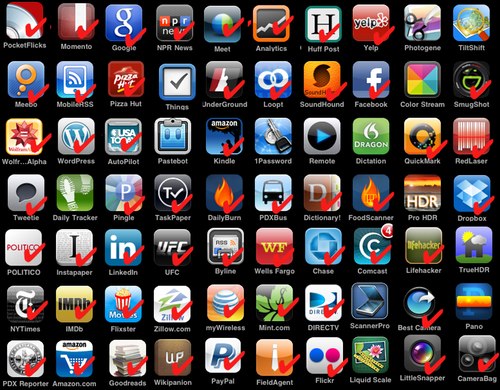
The thing a few years of iPhone use and a week of iPad use have caused me to consider is the ways in which Apple’s perceived “retreat” from Steve Jobs’ initial insistence than Web apps would be enough wasn’t really a retreat so much as a reframing. To help make the point, here’s a picture of all the apps on my iPhone, some with red checks.
I’ve left a few things out:
-
I haven’t included the apps that ship with the iPhone.
-
I haven’t included the page of games I’ve got.
-
I haven’t included Web pages that I’ve saved as launcher icons.
If an app depends in large part on access to some sort of Web or online data service, it gets a red check.
Out of 70 apps, 58 get the red check. Of the remaining 12, most (seven) are photo or image apps of some kind. A few wouldn’t be there if I couldn’t use them with a Web service, but they can stand alone and require access to the hardware to work correctly.
Of the remaining five, three depend substantially on a network connection and wouldn’t be useful without one, even though they aren’t talking to Web services.
Even among the system apps, which I left out, the address book, calendar, map app, YouTube app, Safari, stock ticker and weather app are all dependent on Web services of some kind to be useful to me (I sync the address book and calendar with Google’s services).
In the end, though, if I just go with the 58 out of 70 apps that depend on Web services for the preponderance of their functionality, that’s 83 percent of the apps I use.
Looking at those 58 apps another way, we can ask how many of their related Web services could just as easily work with another, non-iPhoneOS client. The answer there is “all of them.”
In other words, developers might have wanted the ability to use a more complex toolkit than simple HTML, JavaScript and CSS allow, but since Apple gave them an SDK to play with, they’ve gone to work writing apps that talk to the exact same data stores a person sitting down to a PC would experience via HTML, JavaScript and CSS. That makes sense: iPhones and iPads are touch-driven and they’re very different from desktop browsers. HTML wasn’t created for touch devices and its conventions are dictated by the presence of a largish display and a mouse. All you get with the iPhoneOS SDK is a different set of conventions for getting at the same pool of connected data. That’s how it has worked out in practice, anyhow.
So what’s that got to do with me wanting to learn how to program iPhone and iPad apps?
Simple enough: Initially, I’ll be thinking in terms of how anything I write will relate to some sort of Web service. I’ve got a few ideas already, and I won’t be writing anything in isolation so I’ll be talking to other people who have their own ideas, but in the end anything I write will depend in large part on the Web and it will definitely involve people talking back to that content, either by organizing it in a way that benefits them, sharing their insights about the content with other people, or contributing their own content. Most of the apps I run on my iPhone are all about that. (O.k. One is for ordering pizzas and a few are for checking account balances, but still.)
The platform invites me to indulge my creative urges as a programmer, and it will allow me to create software that lets other people indulge their creative urges as explorers, travelers and sharers. And when I’m looking for a break from programming, it’ll allow me to sit down and write a story, compose an e-mail, edit some photos or wireframe a site.
It’s a real computer. Why some people don’t want to admit that is for them to answer.
#creativity #ipad #programming
-
-
-