Epochal Automator
When Drupal thinks of time, it thinks in Unix timestamps. That is good for computers, not so good for me when I'm staring at a quick database query and just need to know when something happened, was saved, or will be updated next.
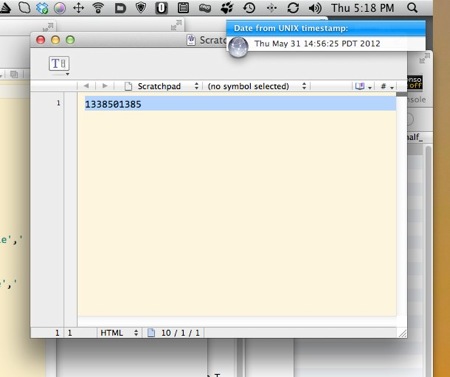
Several months back my friend Sam asked for a way to quickly convert a UNIX timestamp to a human readable date. He had a snippet of Ruby he was using, so we worked out an Automator workflow to take the mouse selection and copy the converted date to the clipboard. I usually just want to see the date, not do anything with it, so here's a version that uses Growl to quickly display the converted date. You need to have Growl installed. I should also note that Growl provides Automator actions, but I couldn't get them to take input from the preceding Automator action.
1. Install the Ruby growl gem. This will give you the Growl command line app, too:
sudo gem install ruby-growl
2. Test that the command line app is working:
echo "Hello world" | growl -H localhost
3. Fire up Automator and tell it you're making a service:
for f in "$@"
do
     date -r $f | growl -H localhost -t "Date from UNIX timestamp:"
done
7. Save it and remember its name.
8. Assign your new service a sensible keyboard shortcut:
8a. Open System Preferences -> Keyboard and click the "Keyboard Shortcuts" tab
8b. Look for your service under "Text"
8c. Click the grayed-out word "none" next to your service, then click "add shortcut"
8d. Enter your shortcut
That's pretty much it.
There are a few more things you can do to customize it. In the Growl System Preferences, you can pick the style of alert for "ruby-growl," including whether or not it makes any sound and whether or not it's sticky.
Here's a sample: