Panopticon 0.1
So, panopticon 0.1 is very simple and it handles:
- recently flagged e-mail in several accounts
- recently flagged/starred items in my RSS reader (NetNewsWire, in sync with Google Reader)
- recently created notes in my Evernote account
- recently added Instapaper items
It executes in a few seconds and adds everything it finds from each of those inboxes to my “Today” list, tagged with “panopticon” and the name of the source, with a due date of 5 p.m.
<div style="text\-align:center;margin:1em;">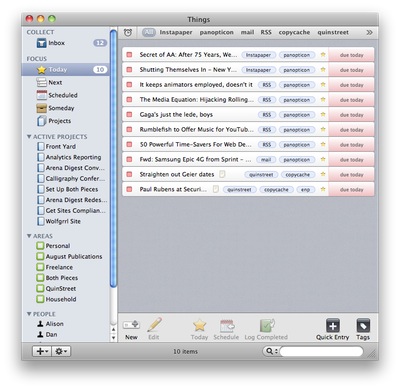</div>I described the point yesterday. Restated:
If you’re one of those people who needs to stop at the end of the day and turn out your pockets, making sure you put your keys in the key place, and your change in a little bowl, and loose receipts wherever you put those, that’s what panopticon is doing for me: Helping me put everything I’ve accumulated from the ’net over the past day in a little glass bowl. That way it won’t get run through the wash or carelessly emptied into the trash.
It’s really not done at all, but I’ve learned that it’s best for me to do the bare minimum to make a thing work before I lose interest in a project. I can always fiddle with it later. So some things I’ve left out for now:
- passing e-mail and RSS items through the summarize service (described here last February) to populate the to-do body
- Things adding the ability to create live links to web pages and messages using the
message://URL handler built into OS X in to-do bodies, but that’s on them. - Checking the Things Logbook list to make sure there’s not a recent item of the same title and source that’s been completed and so is not on the list.
- exception handling. I mean, why not create a to-do out of “something’s going wrong with this script” when something goes wrong with the script?
To change:
- The whole “what’s been seen, what’s been completed?” thing is due for some more thought, really.
- Figuring out how I can do more of this outside of rb-appscript. The big advantage of using appscript instead of consuming a bunch of services and feeds is that you don’t have to go around either finding gems that talk to assorted APIs or parsing the JSON, etc. that they send back on their own, ask for API keys, etc. You just talk to the apps you use to consume those services. The problem with that approach is that it only works on a Mac. If the giant Mac-eating space robots turn up and enslave us all, ushering in an era where no computer more robust than an Ubuntu netbook is permitted to function on the surface of the planet, I’m screwed.
I’d file it under “secret software,” but it’s not because it’s posted here. But it’s at about that level: Won’t blow anything up, even when it doesn’t work it will help me a lot more than if it weren’t running at all.
What continues to be awesome to me about it all: 81 lines of code. The magic is all in the eight ‘require’ lines at the top, where much more talented people provide me with the tools I need to say things in such a simple, forgiving way. I mean ...
notes = @evernote\.notebooks\["Inbox"\]\.notes\[its\.creation\_date\.gt\(Time\.now \- 2\.days\)\]\.getThat’s just neat.
<div id="snipplr\_embed\_36663" class="snipplr\_embed"><a href="http://snipplr\.com/view/36663/panopticon/">Code snippet \- Panopticon</a> on Snipplr</div><script type="text/javascript" src="http://snipplr\.com/js/embed\.js"></script><script type="text/javascript" src="http://snipplr\.com/json/36663"></script>#adhd #appscript #attention #panopticon #ruby