All Hail iTunes?
Update: Rats! “In the Year 2525” is only available as a crappy techno remix! iTunes Music Store sucks! But it has “Ballad of the Green Berets”! iTunes Music Store Rocks! (ad infinitum).
For a more big picture assessment of iTunes Music Store (which involves a deal with AOL), there’s also a report from my colleague at sv.internet.com.
Just finished downloading iTunes for Windows. A few days ago I predicted it would be a buggy, unstable mess. I don’t know whether it is or not… that will take a few days, but here’s the basic rundown:
iTunes is clever about building a library of available tracks.
It’ll discover anything in a “My Music” folder, and it can be pointed
whereever else you might keep mp3s.
Burning to CD “just worked.” I built a list of files, drug them to
the sidebar, and clicked on the “burn” button. About five minutes
later I had an audio CD.
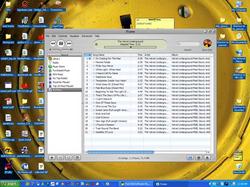
iTunes for Windows
The killer feature as far as our household is concerned is probably
music library sharing. We have one Windows desktop machine where I do
most of my day work if it involves a word processor; and we have an
iBook with an Airport card. After I had iTunes find all of my mp3s
and add them to its library, it was a simple matter to open up the
preferences panel, toggle a few options, and allow other iTunes users
on the network to get at my library:
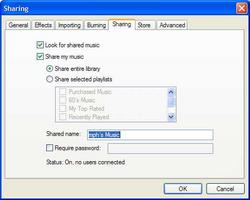
Setting up sharing on iTunes for Windows
The iBook spent an extra five seconds starting up iTunes before it
found the library, then it was able to get at the tracks and play them
over the network as if they were on its own hard drive:
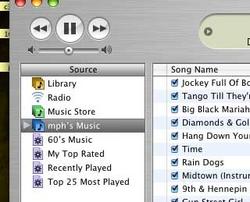
iTunes on the iBook with access to a Windows-based library
That’s all done through <a
href=“http://www.apple.com/macosx/features/rendezvous/">Rendezvous,
which makes things finding each other on the network (like computers
finding printers, or file shares, or instant messaging users) simpler.
iTunes for Windows also has full access to the iTunes Music Store,
which provides $0.99/song downloads. The store’s catalog still has
some gaps of note, but it’s improving. The best part of that service
for my own uses are the liberal burning rights: There are limits on
the total number of times a given playlist can be burned to CD, so’s
to prevent mass duplication of a whole CD, but the number of custom
mixes that can be burned is unlimited.
This isn’t going to please the “boycott the RIAA” element, for whom
there can be no compromise. It isn’t going to matter to people who
remain unconcerned with the potential legal consequences of getting
caught sharing enough files to catch the attention of the RIAAs
litigators. It works for me, though. There are more good songs than
there are good albums, and iTMS lets me get at them for a price that’s
probably reasonable for now (though we’ll see if it goes down once the
market gets competitive).
Finally, as a player, iTunes isn’t bad. The interface on Windows
is pretty much a clone of what shows up on a Mac, with the exception
of the title bar and the open/close/minimize widgets. I suffered a
little interface shear when I closed its window the first time: on a
Mac, it keeps playing music because the application isn’t truly exited.
On Windows, close means “close this window and exit.”
The closest thing I can compare it to at this point is MusicMatch
Jukebox, which costs money, arrives in full-on advertising mode,
and has an interface from hell. There’s not much of a conversation.
If the bottom doesn’t fall out of iTunes, I’m done with MusicMatch:
iTunes is cleaner, simpler, and nicer to use, and it has the benefit
of talking to both desktop platforms I’m running here.